
Octave
octave is a high-level language, primarily intended for numerical computations. It's used in CUED undergraduate courses and is on the MDP Resource CD.
- For a tutorial see the Introduction to Octave/MATLAB
- For exercises, see the Michaelmas Term Part IB Computing Course
Installing Octave on Macs
There's currently no reliable, easy way to install Octave with graphics on Macs. To install the non-graphics Octave
- Go to http://octave.sourceforge.net/ and follow the "Octave.app for Mac OS X" link.
- Download either the "PPC" version (for old Macs with "PowerPC" chips),
or the "i386" version (for Macs with Intel chips). At the end of the
download you'll see a window like this
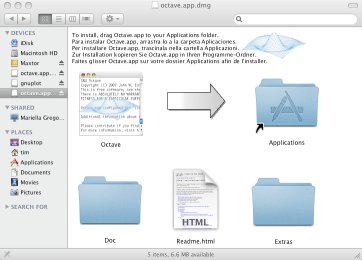
Drag the "Octave" icon onto the "Applications" icon.
Installing Octave on Windows
Install the latest stable release of Octave by following the instructions at http://octave.sourceforge.net/. The installer will ask you a number of questions: in each case, the default answer is fine. You might also want to install the SciTE text editor for writing Octave .m files. Alternatively, you could use one of the default Windows text editors, but beware their tendency to save text files with the extension .txt, you will need to change this to .m for Octave programs. (by Andrew Gee)